News  - 2 Jun 2022

PDS Idler – Conveyor Schematic

A Clearer Way to Visualise Idler Placement and Condition

A new schematic option is now available in PDS Idler where an image can be added to the Idler Dashboard and included in reports.

What is it?

The Schematic is a new feature where you can add an image to assist crews during idler replacements.  This image could be a conveyor schematic which points out where specific idler frame numbers are, or could be a photo of the idler lay down areas for that conveyor.

How does it work?

On the Web UI in PDS Idler there is a new button on the blue ribbon labelled “Schematic” which is visible when you have selected a conveyor.  Press this button to add or view a schematic.

The schematic can now be viewed on mobile devices by simply tapping on the conveyor icon to view the image:
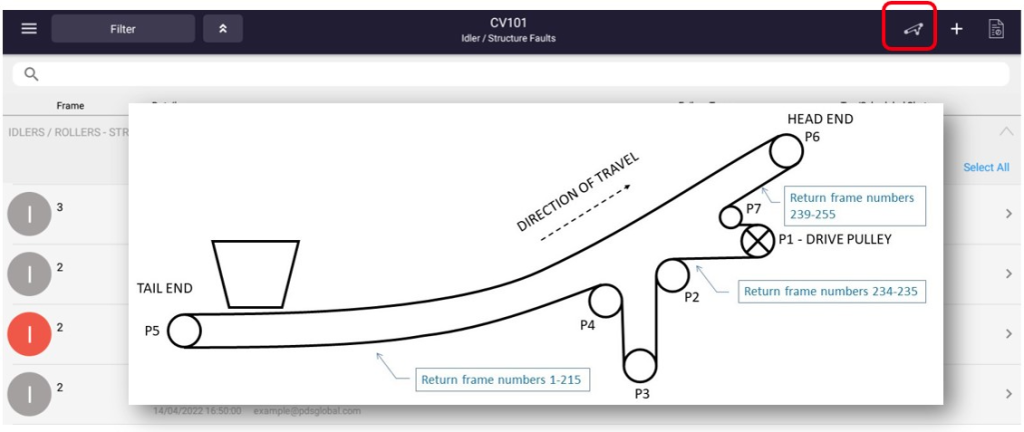
The schematic can also be selected to show in either the Work Management reports or the Shutdown & QA Reports.  This will assist replacement crews who may not be familiar with the conveyors.

Questions / Demo

Any questions regarding this feature, please contact us.

"*" indicates required fields

This field is for validation purposes and should be left unchanged.

Thanks for Requesting our Capability Statement

Please provide us quick details and the file will be sent to your email shortly.

"*" indicates required fields

This field is for validation purposes and should be left unchanged.

Thanks for Requesting our Wear Brochure

Please provide us quick details and the file will be sent to your email shortly.

"*" indicates required fields

This field is for validation purposes and should be left unchanged.

Thanks for Requesting our Idler Brochure

Please provide us quick details and the file will be sent to your email shortly.

"*" indicates required fields

This field is for validation purposes and should be left unchanged.

Thanks for Requesting our Inspect Brochure

Please provide us quick details and the file will be sent to your email shortly.

"*" indicates required fields

This field is for validation purposes and should be left unchanged.

Thanks for Requesting our Complex Brochure

Please provide us quick details and the file will be sent to your email shortly.

"*" indicates required fields

This field is for validation purposes and should be left unchanged.

Thanks for Requesting our Audit Brochure

Please provide us quick details and the file will be sent to your email shortly.